
WordPress database optimization – Why WordPress Developers Should Care About it?
December 17, 2024 0 comments
Why Developers Should Care About WordPress Database Optimization?
WordPress developers just install WordPress, build a site on top of it, install plugins and deliver the site to clients. They do not go beyond it. WordPress, with its user-friendly interface and vast plugin ecosystem, has democratized web development. It allows individuals with minimal technical expertise to create functional websites. However, this ease of use can sometimes lead to a misconception: that WordPress handles everything, including database optimization. While WordPress does automate many database tasks, experienced (PHP!) developers know that neglecting a WordPress database (which is MySQL) health can have serious consequences.
This article delves into why WordPress developers should prioritize database optimization, exploring its impact on website performance, security, and scalability. We’ll also examine common database issues and provide practical optimization strategies.
The Hidden Cost of Neglecting Your Database
Imagine a bustling online store built on WordPress. As the business grows, so does its website traffic and the volume of data stored in its database. Product information, customer details, order histories, and countless other records accumulate over time. Without proper optimization, this data can become disorganized and inefficient, leading to:
- Sluggish Performance: A bloated database resembles a cluttered room; finding what you need takes longer. This translates to slow loading times, frustrated visitors, and higher bounce rates. This is an enemy of SEO!
- Security Vulnerabilities: Redundant and outdated data can become a security liability. Unpatched vulnerabilities in older versions of plugins or themes can be exploited by attackers. This could be a business-killer, sometimes!
- Scalability Issues: As a website grows, an unoptimized database can struggle to keep up with increased traffic and data demands. This can lead to downtime and lost revenue.
- Maintenance Nightmares: Neglecting database optimization can turn routine maintenance tasks into complex and time-consuming ordeals. You need Hosting’s grace in this situation.
Case Study: The Online Store That Crumbled
A popular online clothing store experienced a sudden surge in traffic during a holiday season like this. Their WordPress site (which was built with WooCommerce), burdened by an unoptimized database, buckled under the pressure. Slow loading times led to abandoned shopping carts, frustrated customers, and ultimately, a significant loss of revenue. A post-mortem analysis revealed that the database was riddled with:
- Thousands of unnecessary post revisions: Every minor edit to product descriptions had created a new entry in the database.
- Spam comments and transient data: Unattended spam comments and temporary data had accumulated, taking up valuable space.
- Bloated tables: Database tables had not been optimized, leading to fragmented data and inefficient queries.
This case study highlights the real-world impact of neglecting database optimization, even on a platform as user-friendly as WordPress.
Taking Control of Your WordPress Database
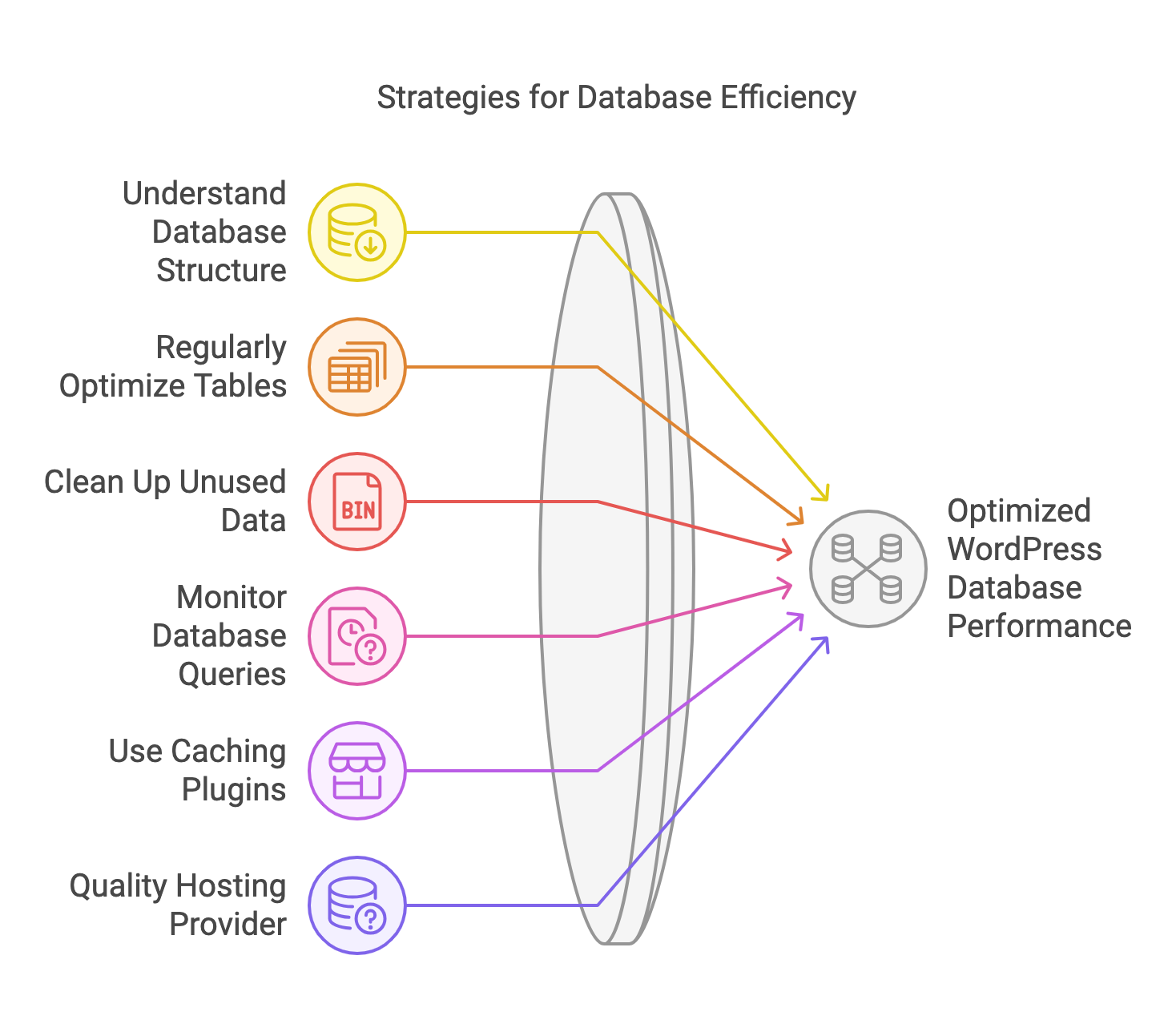
While WordPress simplifies database interactions, experienced developers should go beyond basic management. Here’s how:
- Understand the WordPress Database Structure:
Familiarize yourself with the core WordPress tables (wp_posts, wp_users, wp_options, etc.) and their relationships. This knowledge is crucial for effective optimization.
- Regularly Optimize Database Tables:
Use optimization tools like phpMyAdmin or plugins like WP-Optimize to defragment tables and reclaim unused space. Think of it as tidying up your database, ensuring data is stored efficiently.
- Clean Up Unused Data:
- Delete unnecessary post revisions: Keep only a few recent revisions to avoid unnecessary bloat.
- Remove spam comments and trashed posts: These take up space and can pose security risks.
- Delete expired transients: Transient data is temporary information stored in the database. Regularly clearing expired transients can free up significant space.
- Monitor Database Queries:
Identify and optimize slow-loading queries that impact performance. Tools like Query Monitor can help pinpoint bottlenecks.
- Consider Caching Plugins:
Caching plugins like WP Super Cache or W3 Total Cache store frequently accessed data in temporary storage, reducing the need to query the database repeatedly.
- Choose a Quality Hosting Provider:
Your hosting environment plays a crucial role in database performance. Opt for a provider that offers optimized server configurations and robust database support.
- Implement Lazy Loading:
Lazy loading delays the loading of images until they are visible on the screen, reducing initial page load time and database queries.
- Optimize Images:
Large image files can significantly impact website speed and database performance. Optimize images before uploading them to your WordPress site.
- Limit the Number of Plugins:
Each plugin adds code and potentially database queries to your website. Only use essential plugins and choose lightweight options whenever possible.
- Keep WordPress, Themes, and Plugins Updated:
Updates often include performance improvements and security patches that can benefit your database.
Conclusion
If you are, as a developer responsible for your Client’s WordPress website, you cannot be ignorant about WordPress database Optimization. You need to inform the client, and care about the DB as part of your regular WordPress Maintenance tasks. Developers, regardless of their experience level, should prioritize WordPress database optimization. It’s not just about keeping a website running smoothly; it’s about ensuring its long-term health, security, and scalability. By understanding the WordPress database structure, implementing best practices, and utilizing optimization tools, developers can create websites that are not only visually appealing but also performant and secure.
Remember, a well-optimized database is the foundation of a successful WordPress website. By taking proactive steps to maintain its health, you can ensure your website remains a valuable asset for your clients or your own business.
Related Posts
-
 October 29, 2020
Getting started with Digital marketing – Part 1 – The major channels for the new decade.
We have planned to write a series of blogs on Digital Marketing. We will explain things in simple terms. We will try to cover the maximum. Each will come in different titles. We are Macronimous crossed 20+ years in Digital Marketing. This team "Digital Marketing" is present here for a
Content Marketing, Digital Marketing, Internet Marketing, Search Engine Optimization, SEO, Social Media Management, Welcome0 comments -
 December 27, 2024
dBase to Modern Databases: A Personal Journey Through Database Evolution
My journey into the world of databases began, like many others in my generation, with the humble dBase III+. Back then, it felt like pure magic. I was a wide-eyed programmer, marveling at how this seemingly simple software could store and retrieve information so efficiently. I didn't understand the intricacies
