
HTTP error codes 404 vs 410 and how Google treats them. Matt cutt explains.
April 15, 2014 2 comments
In this video, Google’s Matt Cutts explains the difference between 404 and 410 and how Google’s crawler treats them when it comes across these errors. Both 404 and 410 are HTTP status codes, and SEO‘s should know what they are and how to use them effectively.
404 is page not found
When a page is not found, the web server shows a 404 error, and this is bad for SEO. However, You can customize a 404.htm or 404.php and make the page look user-friendly. When the user types a wrong URL or opens a page which has been moved, a 404 error occurs.
Matt says, For 404 Google crawling system will keep trying for next 24 hrs without giving up in the first place.
410 – permanently gone
This HTTP error 410 means the page is not going to come back, and it’s permanently at a dead end.
For 410 Google crawler assumes that it was gone, and the webmaster knows this already. HOWEVER, Matt says that Google crawler still try again to ensure that it is a 410 and not a 404.
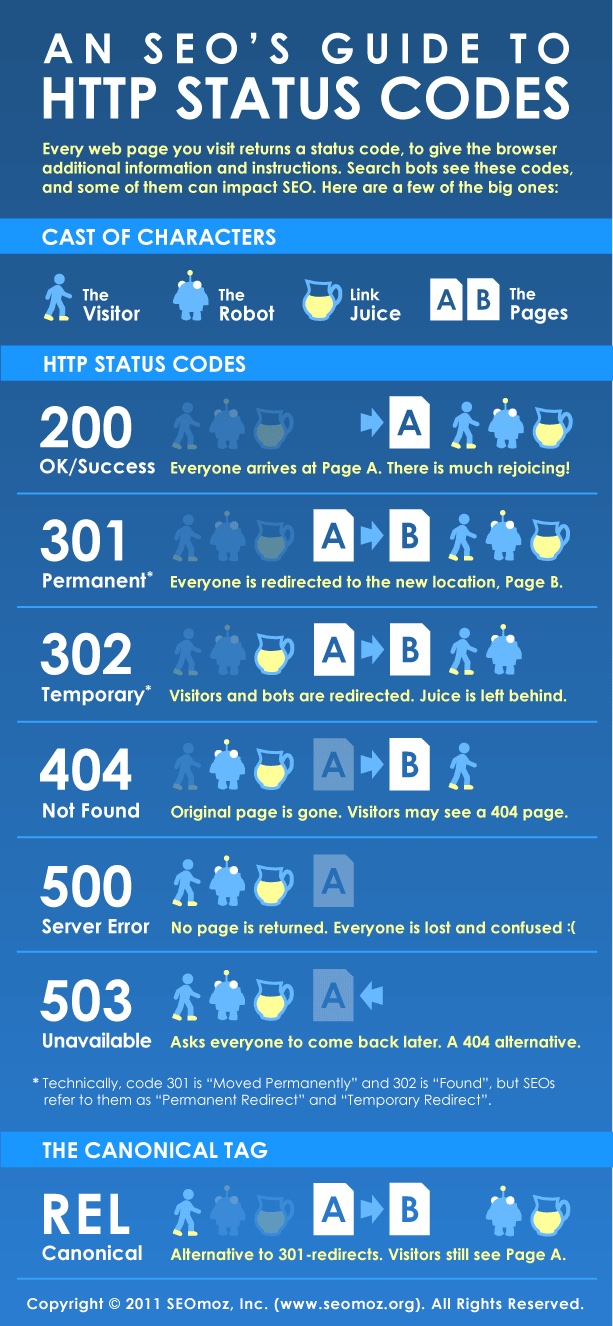
If you like to learn more about the HTTP error codes, you should take a look at MOZ’s infographic show below:
Related Posts
-
 March 13, 2020
The why, how and what else of ROI driven SEO
To get business online, the first step is to build a website. But having built one does not guarantee Business Conversions. This both of us know. The real deal begins when we start marketing and see the clients come through. But, given that there are thousands of websites, of which,
Google SEO, Internet Marketing, Link Building, Search Engine Optimization, SEO0 comments -
 April 23, 2012
6 things to make your site content SEO ready
Flashy images and videos on a website may look attractive in terms of the site’s design. They may also be highly relevant to the website owner’s business but are they enough to bring top results in search engines. The designers who must have worked on that website may say YES,
