
All about Keyword cloud
March 31, 2010 2 commentsWhat is Keyword cloud?
Keyword cloud represents most used keywords in a site visually, by showing it in different font sizes and it is known to be a Search Engine Marketing (SEM) term. It differs from larger to smaller in font sizes. A keyword that has been used more around the site and blog, which we call as keyword density, are shown in larger fonts. According to the keyword density, the font size varies from larger to smaller. On looking at the keyword cloud size variation, users can see the importance of the keywords that relates to website or a blog.
Benefits of keyword cloud
Keyword cloud is benefited to find relevant and useful web pages for the user who looks for certain information.
By using the keyword cloud, popular words (density rich words) are shown and it is as well clickable for users. When users find a keyword listed in keyword cloud useful, then he will be going for a click on the particular keyword and he will be taken to the category search results page were all pages or blog posts will be listed related to the tagged keyword.
Make sure the keywords in the cloud section are not overlapped and ugly. Have it in a place where users could find it easily. The better option is to have it in the sidebar of a site or blog.
Here is a site that helps to generate a keyword cloud by mentioning your web link.
WordPress Keyword Cloud generator plugin
The below WordPress plugin helps you to install keyword cloud to your blog or site
http://wordpress.org/extend/plugins/resize-tag-cloud/
http://wordpress.org/extend/plugins/keywords-cloud-for-wordpress/
http://wordpress.org/extend/plugins/simple-tagging-plugin/screenshots/
How will Keyword cloud look like?
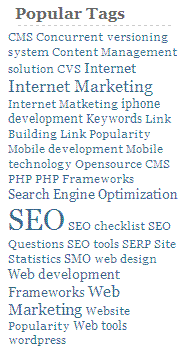
If you find any other interesting information about Keyword cloud, you may share through comments.
Related Posts
-
 January 3, 2019
Step by Step guide to upgrade your blog or website to WordPress 5.0 Gutenberg
When every WordPress website owner is figuring out what the latest WordPress 5.X version and Gutenberg editor is, we are thrilled to give you the 5 steps to do the upgrade. 1.Check Compatibility: Before proceeding with the upgrade, first check whether your theme and installed plugins are compatible with new
Blogging, CMS, Content Management Systems, Macronimous, Welcome, WordPress, wordpress0 comments -
 November 7, 2024
Decoding Search Intent: Unlocking Traffic with Smart Keyword Analysis
Keyword research? That's SEO 101. But smart keyword analysis? That's where even seasoned pros trip up, especially when it comes to aligning keywords with search intent – a misstep that can sabotage your SEO efforts. Hey there, fellow SEO professionals and website owners! We all know the struggle is real.
