
Should Your Website Block AI Bots? A Practical 2026 Answer
September 16, 2026 0 comments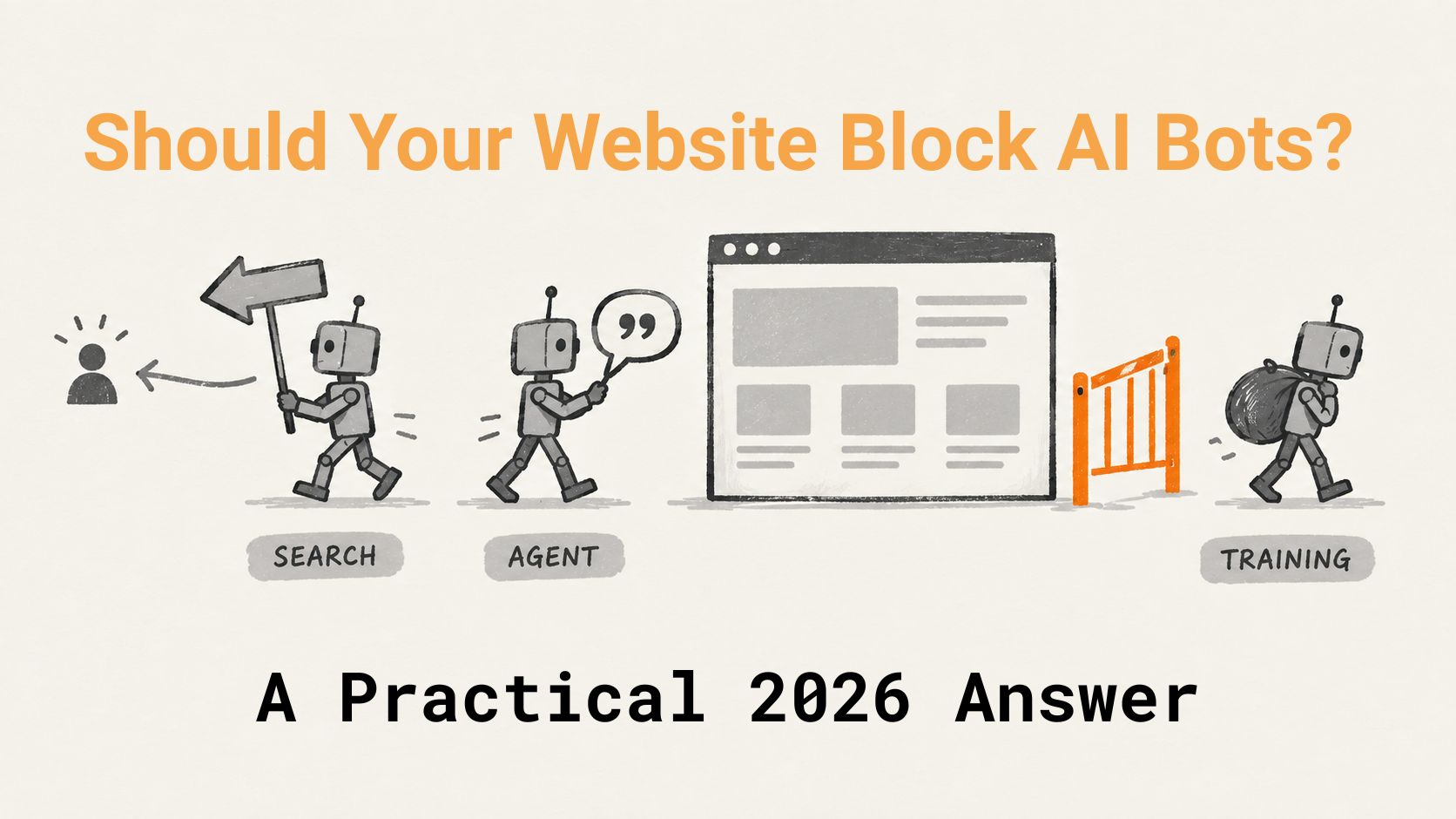
Blocking AI bots is the wrong question, because there are three kinds and they do different things. Search bots and agent bots send you traffic or citations, so allow them everywhere. Training bots give nothing back, so decide page by page: allow on marketing content you want AI to know about, block on anything you charge for. And in Cloudflare, use the new Disallow AI Training setting, not Block: since September 15, 2026, Block stops Googlebot too.
The question a client asked me last month
“Should we just block all the AI bots?” That’s the email, more or less, that landed from a client who runs a cremation arrangement service a few weeks ago. He’d read a headline about Cloudflare blocking AI crawlers, opened his dashboard, found a toggle that said Block AI Bots, and had his finger on it. He wanted to know if it was a good idea.
It isn’t, for him. And I suspect it isn’t for most of the people reading this, because if you run a business site, your content isn’t the product. It’s the bait. The whole point of the service page is that someone finds it, reads it, and calls you. If an AI assistant reads it and tells a prospect “these people do Magento migrations, here’s their site,” that’s the same outcome, just with a different middleman.
So no, I wouldn’t block everything. But I also wouldn’t allow everything, and the reason is that “AI bots” is three different things wearing one label.
Three bots, not one
Every big AI company now runs at least three crawlers, and they have different jobs. OpenAI is the clearest about it. OpenAI’s crawler documentation lists GPTBot for training, OAI-SearchBot for ChatGPT’s search index, and ChatGPT-User for the moment a real person asks ChatGPT to open your page. Anthropic mirrors that with ClaudeBot, Claude-SearchBot, and Claude-User. Google does it the odd way round: one Googlebot fetches everything, and a separate robots.txt token called Google-Extended tells Google after the fact whether it may use what it fetched to train Gemini.
Cloudflare’s names for the three are the ones that stuck, so I’ll use them:
| Type | What it does | Examples | What you get back |
|---|---|---|---|
| Search | Indexes your pages so an engine can answer questions later | Googlebot, Bingbot, OAI-SearchBot, PerplexityBot | Referral traffic, citations in AI search |
| Agent | Fetches a page live because a person asked | ChatGPT-User, Claude-User, Google-Agent | A citation in the answer, sometimes a click |
| Training | Copies content to build the next model | GPTBot, ClaudeBot, CCBot, Google-Extended, Bytespider | Nothing direct. Maybe brand familiarity in a future model |
The trouble with a single Block AI Bots switch is that it treats a Perplexity fetch that’s about to cite you the same as a Bytespider crawl that’s copying your site for a model you’ll never hear of. Those aren’t the same decision.
What each one is worth to a business site
Search bots are easy. Block them and you vanish from search, and now “search” includes ChatGPT search, Perplexity, and Bing Copilot. OpenAI says plainly that a site which opts out of OAI-SearchBot won’t be shown in ChatGPT search answers. Allow these. I can’t think of a business reason not to.
Agent bots are the ones people don’t understand yet, and they’re the ones that matter most for what we’ve been calling answer engine optimization. When someone types “reliable WooCommerce developers with SEO experience” into Claude or ChatGPT and the assistant goes and reads three agency sites before answering, that read is an agent fetch. If you’ve blocked it, you’re not in the answer. You don’t get a pageview in Google Analytics for it (well, sometimes you do, depending on the bot), but you get the thing a pageview was always a proxy for: a prospect hearing your name.
Training bots are the honest “it depends.” A training crawl gives you no click, no citation, and no attribution. What it might give you, and I’m guessing here because nobody outside the labs really knows, is that the next model has some idea who you are. For a small agency that’s arguably worth more than the content it takes. For a publisher whose articles are the product, it’s a straight loss, and that’s the audience Matthew Prince was writing for when he declared Content Independence Day back in July 2025. His numbers were brutal: by Cloudflare’s count it’s roughly 750 times harder to get a click from OpenAI than from old-school Google, and 30,000 times harder from Anthropic. Fair enough, if you sell ads. Most of our clients don’t.
If your site exists to get you hired, being read by an AI assistant is the goal, not the threat. Block the bots that only take, and let in the ones that mention you.
What I’d allow, and what I’d block
Here’s the split I’d use for an agency, a SaaS product, a B2B service firm, or a local business. Publishers and paywalled sites are a different post.
Allow everywhere: every search crawler, every agent fetcher. No exceptions on public pages.
Allow on marketing content: training crawlers on your service pages, your blog, your case studies, your about page. This is the content you want a model to have absorbed when a prospect asks it a buying question next year. You wrote it to be found. Let it be found. The exceptions are in the next two paragraphs.
Block training on: anything you sell or gate. Pricing calculators, downloadable frameworks, client portals, proposal PDFs, course content, the internal playbook you accidentally left at /wp-content/uploads/. This is content with standalone value, and a training crawl is the only kind of visit that takes the value without leaving anything.
Block outright, whatever the category: crawlers that give nothing back and don’t declare themselves. Bytespider (ByteDance) is the usual offender. Unknown user agents hammering the same unchanged pages. Anything that ignores robots.txt, which, I should note, Cloudflare reported Perplexity doing with undeclared crawlers in August 2025. That one was a category problem, not a business decision.
Where Cloudflare comes in, and what changed on September 15
This is the part that’s been in the news, and it’s also the part I had to rewrite the night before publishing, because Cloudflare moved the goalposts on September 15. Bear with me for a slightly technical section.
On July 1, 2026, Cloudflare retired the single Block AI Bots toggle and replaced it with the three controls above: Search, Agent, and Training, each one you can set separately, on every plan including Free. The July announcement also warned that from September 15 a Training block would catch Googlebot, because Googlebot does search and training in one fetch. That warning is why half the SEO industry spent the summer nervous.
Then on September 15 Cloudflare published a follow-up that mostly defuses it. There’s a fourth option for the Training control now, called Disallow AI Training. Pick it and Cloudflare writes the no-training preference into your robots.txt for you (Google-Extended, Applebot-Extended, and so on), keeps letting Googlebot, Applebot, and Bingbot crawl for search, and blocks the training-only crawlers from OpenAI, Anthropic, Meta, and Amazon at the edge. Google, Apple, and Microsoft signed up to what Cloudflare is calling the Accountable designation, which means they’ve promised that opting out of training won’t touch your rankings. One gap: Bing doesn’t read a no-training line in robots.txt yet (Microsoft says early 2027), so for Bing you still need the NOARCHIVE meta tag.
The trap didn’t go away, though. It moved. The plain Block setting on Training now does exactly what it says, which means a site owner who reads “Block” as “block AI” (a reasonable reading, and the one every headline since July has encouraged) and picks it because it sounds like the safe choice will find that Cloudflare takes them at their word and stops Googlebot, Applebot, and Bingbot at the edge, with a 403 that never touches robots.txt and never reaches the server, so the site looks fine from the inside while pages quietly drop out of the index, and the first anyone hears of it is a crawl-stats dip in Search Console three or four weeks later. The good news for the people who flipped the old toggle in 2025 and forgot: Cloudflare migrated that to Disallow AI Training, not Block, so Googlebot keeps coming. The migration also sets Agent to “Block on pages with ads,” which does nothing on a site without ads. If you never touched any of it, everything stays on Allow.
Why blocking doesn’t protect you much anyway
This next part is what the logs show, whether or not it sounds defeatist.
Robots.txt is a request, not a lock. The well-behaved crawlers honor it (OpenAI, Anthropic, Google, Bing all say they do, and as far as I can tell they mean it). The badly behaved ones don’t, and those are the ones you were worried about. A Cloudflare edge block is stronger because it’s enforced before the request reaches you, but it’s only as good as Cloudflare’s ability to identify the bot, and a crawler that spoofs a Chrome user agent from a residential proxy looks like a person. So you end up in the position where a block reliably keeps out the polite companies that would have cited you, and unreliably keeps out the ones that wouldn’t have. That’s a bad trade for a site whose content isn’t for sale.
Blocking is worth doing when the content has a price. As a gesture it costs you citations and protects nothing.
What we do on our own sites
Macronimous.com has sat behind Cloudflare since 2013 (I wrote about setting it up back then; it took under ten minutes and I stand by that). Our current policy is exactly the split above: Search and Agent allowed everywhere, Training allowed on the public marketing pages and blog, and blocked only on the handful of paths where we keep client deliverables and internal tooling. We’ve never turned on the legacy Block AI Bots toggle, so the September migration left everything on Allow, and I checked the dashboard on Tuesday to make sure. I’ll probably switch Training to Disallow AI Training once I’ve watched it for a couple of weeks on a test domain.
Over the last thirty days our logs show around 30 requests from agent-class bots against the blog. Jeffy on our team pulled that from Cloudflare’s AI Crawl Control; I haven’t verified it against the origin logs yet, so treat it as directional, and yes, thirty is a small number for a site our size. We’re also building a small internal tracker that asks the major assistants our own buying questions every week and records whether Macronimous comes up. Early, and I’ll write it up when the numbers mean something.
The robots.txt I’d start with
For a typical WordPress business site, this is the baseline. Adjust the training block to your own gated paths.
|
1 2 3 4 5 6 7 8 9 10 11 12 13 14 15 16 17 18 19 20 21 22 23 24 25 26 |
# Search: allow User-agent: Googlebot User-agent: Bingbot User-agent: OAI-SearchBot User-agent: PerplexityBot User-agent: Claude-SearchBot Allow: / # Agent: allow User-agent: ChatGPT-User User-agent: Claude-User User-agent: Google-Agent Allow: / # Training: allow public, block gated User-agent: GPTBot User-agent: ClaudeBot User-agent: Google-Extended User-agent: CCBot Allow: / Disallow: /resources/premium/ Disallow: /client-portal/ # Gives nothing back: block User-agent: Bytespider Disallow: / |
Note that Google-Extended in that list doesn’t stop Googlebot from fetching the page; it only tells Google not to train Gemini on it. Cloudflare’s Disallow AI Training setting writes that same line for you, so if you’re on Cloudflare you can let it manage this block and keep the rest.
Checks to run this week
- Open Cloudflare, go to Security, then Settings, and read what the Training control migrated to. It should say Allow or Disallow AI Training. If it says Block, Googlebot is blocked; change it today.
- If you want to refuse training, pick Disallow AI Training, not Block, and turn on Bot Preference Sync so the robots.txt lines get written for you.
- For Bing, add the NOARCHIVE meta tag on pages you don’t want used for training, because the robots.txt preference doesn’t reach Bing until 2027.
- Pull a week of origin logs and look for 403 responses to Google’s published IP ranges. That’s the only place an edge block shows.
- Watch Search Console’s crawl-stats report for a drop in Googlebot requests since September 15.
- Update robots.txt along the lines above, and check the live file, not the one in your theme folder (a stale plugin-generated robots.txt is a classic piece of WordPress technical debt).
- Run your key service page through our AEO readiness checker to confirm agent bots can actually read what’s on it once they’re let in.
That’s about all I know at this point. The rules changed the day before I published this, and Cloudflare has already said AI summaries opt-outs are next, early next year; if you’ve seen something in your own logs that contradicts any of this, tell me in the comments and I’ll correct the post with credit. For where this sits in a wider plan, our 2026 SEO strategy notes cover the rest of the AI-search picture.
Not sure what your Cloudflare settings are doing to Googlebot?
We audit crawler access, robots.txt, and AI visibility as part of our SEO and AEO retainers, and we’ll tell you if the fix is a five-minute toggle rather than a project.
Related Posts
-
 November 15, 2024
SEO survival tips: Top SEO Challenges and Solutions for 2025
For seasoned SEO professionals, understanding the phrase "SEO survival guide" wouldn't have been a big problem. Since, The SEO landscape is in constant flux, and 2024 is no exception. We learned survival with Google SEO over two decades, especially after Google Panda, Penguin, Hummingbird etc. This year has presented
Digital Marketing, Google SEO, Internet Marketing, Search Engine Optimization, SEO, Technical SEO0 comments -
 July 29, 2025
7 Actually Useful AI Plugins for WordPress Developers (No Bloat, No Gimmicks)
7 Actually Useful AI Plugins for WordPress Developers (No Bloat, No Gimmicks) Every WordPress developer eventually faces it: the 'new problem, find a new plugin' merry-go-round. It's a familiar challenge, often tedious and time-consuming. And if you thought that was tough, try navigating the world of 'AI-powered' WordPress plugins. The
