
An MCP server for WordPress plugin audits.
Auditra is a free WordPress plugin that lets an AI assistant like Claude read everything about your site's plugins — installed, deleted, and forgotten — and answer your questions about them in plain English.
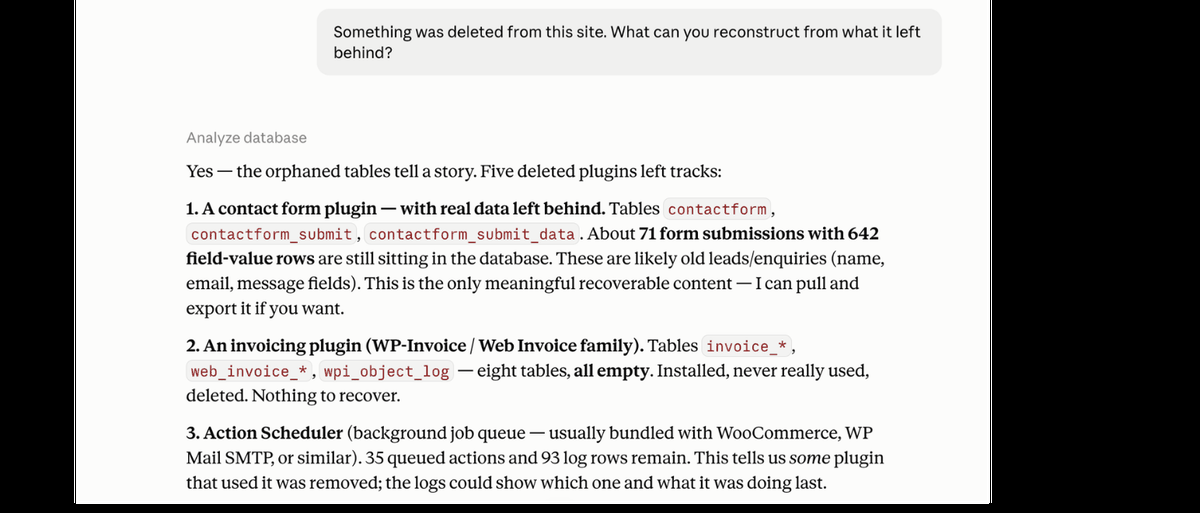
Why would you want that? Because the Plugins page in your WordPress dashboard tells you three things about each plugin you have installed: name, version, description. It doesn't tell you that a plugin someone deleted in 2019 still loads 19 KB of leftover settings on every page load. It doesn't tell you that a contact form removed years ago left 642 rows of names and email addresses in a database table your privacy tools can't see. It doesn't tell you which of your two SEO plugins is generating the sitemap Google actually reads.
Those are the questions that matter on a site that's been alive for a decade. This is how you ask them.
What it answers
Auditra ships nine tools, and every one of them is read-only.
- InventoryEvery plugin, including must-use plugins and drop-ins, which never appear on the Plugins page at all.
- VulnerabilitiesMatched against the version you actually have installed, not just the slug.
- Supply-chain auditsPlugins whose ownership or update channel has been compromised. Reported separately from CVEs, because they mean something different.
- Support lifecycleWhether your PHP and database versions have passed their vendor-published end-of-life date, and whether the WordPress release you run is the current one, outdated, or carrying known security issues.
- Health signalsTime since last update, tested-up-to version, and whether a plugin has been pulled from the directory.
- Autoloaded weightHow many bytes each plugin adds to every page load, attributed by owner.
- CronScheduled events per plugin, and orphaned events still firing from plugins that were deleted.
- DatabaseCustom tables with sizes, and orphan tables left by plugins nobody remembers installing.
- UsageWhich shortcodes and blocks a plugin registers, and how often they actually appear in your content.
The interesting answers come from combining those. Ask what a site's leftover junk is and you get archaeology — orphaned tables and stranded options traced back to the plugin that left them, years after it was removed.
What it won't do
It cannot change anything. No activating, deactivating, deleting, or updating. That is structural rather than a promise: the codebase contains no call to any WordPress function that writes plugin state, and the build fails if one is ever added.
It reports facts, not verdicts. The server returns numbers and flags with documented thresholds. It never says a plugin is abandoned, dangerous, or safe to delete. Your AI client does the reasoning, which means the analysis improves as models improve, without the plugin shipping an update.
It does not measure per-plugin runtime cost. Nothing can, without a profiler drop-in. Plenty of tools publish a performance score anyway. This one tells you it cannot measure that, and gives you autoload bytes, cron counts, and table sizes — the things it can actually measure.
It says when it doesn't know. If a data source is unreachable, the response says which one, why, and exactly which plugins went unchecked — by name. If nothing could be checked at all, it returns no findings list rather than an empty one. An empty list reads as “clean,” and that is the most dangerous thing a security tool can imply.
How to connect your WordPress site to Claude
- Install the plugin and activate it.
- Go to Tools → Auditra, enable the endpoint, and generate a token.
- Copy the connection URL into your AI client's connector settings.
- Start a new conversation and ask something.
The endpoint is disabled on install and does nothing until you turn it on. The token is revocable from the same screen at any time.
You'll need WordPress 6.0 or later and PHP 7.4 or later.
The first question you ask takes a few seconds longer than the rest. The plugin is filling its caches. Everything after that answers almost immediately.
Where the data comes from
Each site is its own MCP server. There is no service in the middle, no account to create, and no data of yours held anywhere.
The plugin talks to two public APIs, the WordPress.org plugin API and WPVulnerability, and sends them plugin slugs and version strings. Nothing else leaves the site.
End-of-life dates for PHP, MySQL and MariaDB are not fetched from anywhere at all. They ship inside the plugin, compiled from each vendor's own published policy, so no third service is involved in reporting them.
It supports both the current stateless MCP core and the previous protocol generation, so it works regardless of which spec version your client is on.
Questions people ask
Is there an MCP server for WordPress?
Several. Automattic ships a general-purpose one, the official MCP Adapter arrived in 2026, and most managed hosts are building their own. Nearly all of them can write to your site — create posts, change settings, manage plugins. Auditra is the other kind: a read-only server built for one job, auditing the plugin estate. If you want an AI that manages your site, use one of those. If you want an AI that can inspect a site it cannot break, that's this one.
Can Claude integrate with WordPress?
Yes, through custom connectors. Settings → Connectors → add the connection URL from any MCP-enabled WordPress site. With Auditra that takes about two minutes: install, enable the endpoint, generate a token, paste the URL. The same URL works in any MCP client, not just Claude.
What is MCP in WordPress?
Model Context Protocol — the standard AI clients use to talk to external systems. On a WordPress site, an MCP plugin exposes an authenticated endpoint the AI can query. What the AI can do through it depends entirely on the plugin: some expose full site management, Auditra exposes nine read-only audit tools and nothing else.
Is it safe to enable an MCP endpoint on a production site?
Depends on the server. A write-capable MCP endpoint is admin access by another name. Treat it that way. Auditra's endpoint is disabled on install, token-authenticated, rate-limited, and structurally read-only: the codebase contains no write call, and the build fails if one is ever added. The honest risk is information disclosure: anyone holding the token URL can read your plugin list. That is why the token is one click to revoke.
Free, and open source
Auditra is free on the WordPress.org plugin directory, GPL licensed, with the full source and every design decision documented on GitHub.
It stays free because it costs us nothing to run. Every install talks directly to public APIs from the site it is installed on, so there is no infrastructure bill that would eventually make us regret the word.
The most useful contribution is the prefix map, the file connecting an option name like wpcf7_ back to Contact Form 7. That mapping can never be complete, and every entry added sharpens attribution for everyone.